Showing posts with label Apps. Show all posts

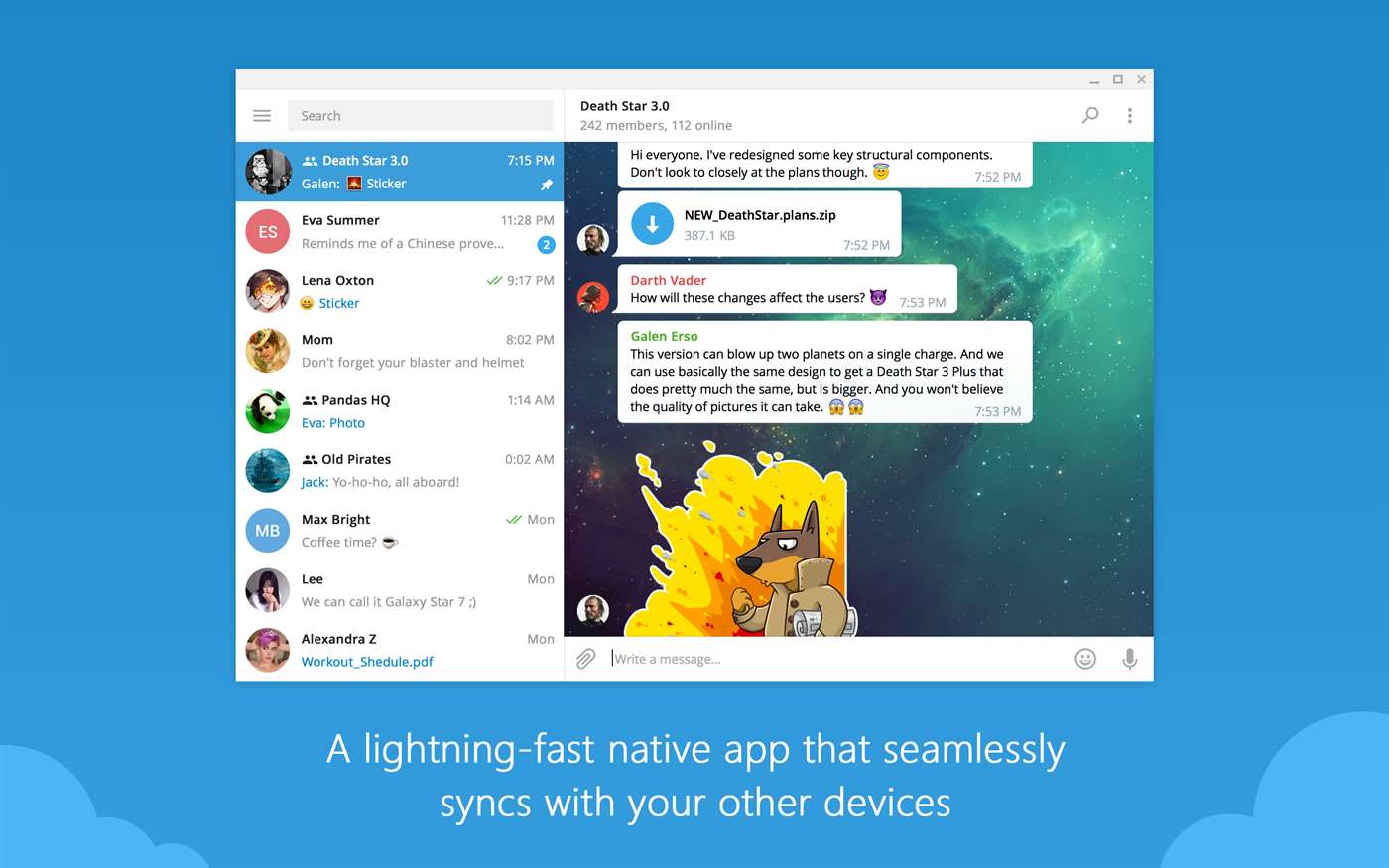
Telegram brings its Win32 or desktop app to Windows Store and its brilliant


Telegram


After releasing a refreshed app for Windows Phone with new Windows 10 design few days ago, Telegram is back with another good news. The classic win32 app is now downloadable from the Windows Store. That means, easier install/uninstall and faster delivery of updates, new features. All of this has been possible with the Desktop App Converter tool.


And we shouldn’t forget, this move will give Telegram access to the hundreds, if not thousands, of Windows 10 APIs to light up features like Live tiles, Cortana integration, interactive toasts etc.
Telegram Desktop


Telegram Desktop


Here are some of the major highlights of the Telegram Desktop app;


  • Fast: Telegram is the fastest messaging app on the market because it uses a distributed infrastructure with data centers positioned around the globe to connect users to the closest possible server.

  • Secure: We made it our mission to provide the best security among mass messengers. Telegram heavily encrypts all your data with time-tested algorithms.

  • Cloud Storage: Telegram seamlessly syncs across all your devices, so you can always securely access your data. Your message history is stored for free in the Telegram cloud. Never lose your data again!

  • Group Chat & Sharing: With Telegram, you can form large group chats of up to 200 members, send broadcasts to up to 100 contacts at a time, quickly share large videos, documents (.doc, .ppt, .zip, etc.), and send an unlimited amount of photos to your friends.

  • Reliable: Built to deliver your messages in the minimum bytes possible, Telegram is the most reliable messaging system ever made. It works even on the weakest mobile connections.

  • 100% free and no ads: Telegram is free and will always be free. We are not going to sell ads or introduce subscription fees.

  • Privacy: We take your privacy seriously and will never give third parties access to your data.

You can download the app from the Windows Store by following the link below.


SureFlap has an app-controlled pet door in the pipeline


Finally coming to the pet tech space this summer: an app-controlled cat door that will tell you when your pet has left the building. RIP privacy for pets!


UK firm SureFlap, which already makes a range of microchipped-enabled pet products such as feeders and pet doors which only open for the correctly chipped (or RFID-collared) pet, reckons pet owners are hankering for even more remote-control options with their high tech pet kit — ergo, they’ve announced an app-controlled version of their microchipped pet door will go on sale this summer.


The forthcoming Microchip Pet Door Connect will have a companion app that enables pet owners to remotely lock or unlock the door from anywhere, and also schedule curfew times to keep their pets in at a specified time of day.


Owners will also be able to receive notifications via the app when their pet leaves or enters the house, and the app will log and track these comings and goings over time — offering a potential route to flag up changes in behavior.


Access to the app can also be shared with others, such as a pet sitter.


SureFlap is using the Xively platform for the connectivity layer for this, its debut IoT device — and says it will be launching a range of connected products this year.


The pet door is designed for use by cats and/or small dogs. It’s priced at £119.99 for the pet door and £49.99 for the hub — or £159.99 for both.


A minimum 1Mbps home broadband connection is required for the pet door to function, plus a spare Ethernet port to plug in the Hub device (pictured above next to the pet door).


The pet door is powered by 4 x C batteries — with typical battery life being more than six months “in most cases”, and up to a year with “normal use”.


SureFlap says it’s using industry standard encryption scheme TLS for the device, with all public facing servers load balanced through AWS’s ELB service to protect their IP addresses. Comms between the pet door and the hub are also encrypted, it adds.


Existing users of SureFlap pet doors won’t be able to use the app as its earlier products don’t include the necessary comms module but the company tells us they will offer these customers an upgrade option.

Blackstorm Labs and Rakuten launch R Games to build high-fidelity HTML5 games


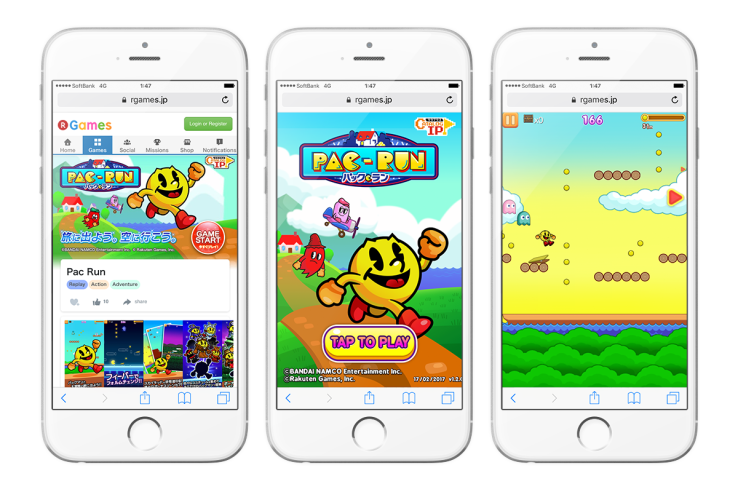
Blackstorm Labs, a startup that’s working to build technology that brings developers tools to get out games and apps more quickly through HTML5, today said it is working with Rakuten to build a new entity called R Games that will serve as a hub for games in Japan and Asia.


Blackstorm Labs has been working with Rakuten for some time on the project, which was rumored last November, but it is coming out officially this evening, and co-founder Ernestine Fu said that working with Rakuten dovetails with users in Asia generally having a more progressive worldview of app distribution. Apps running on Blackstorm Labs’ technology are designed to boot instantly and have the same quality of a regular app without having to download large files.


“If you think about any new distribution platform you try to create, you need to have premiere amazing content on that platform,” Fu said. “The game studio to feed some initial content. But at some point we’ll open to additional developers.”


R Games is more of a “joint spinout,” with Blackstorm basically handling education and development of the technology and relaying that over to Rakuten. R Games already has dozens of people working on games that will be distributed through Blackstorm Labs’ HTML5 technology, and is tapping big brands like Taito to make games like Bubble Bobble and Pac-Man. The startup has one board seat in the venture.


Blackstorm Labs isn’t actually shipping any of its existing employees off to R Games, which would certainly not be a scalable situation if it were to seek additional partnerships and deals like these. But late last year, it became clear that the technology had a opportunity to create, at the very least, a thriving gaming ecosystem based around HTML5 technology, Fu said.


“We built within two days this quick bubble shooter game — it was not polished at all,” Fu said. “We were able to take that game and show it to the folks at Rakuten. It was all these things that were rough but it was one of those big moments that there are new distribution platforms. At the time HTML5 tech was so rapidly changing, Google and Apple were a part of that,”


Games still continues to be one of the strongest showcases of the technology, with the ability to quickly dive into a high-fidelity gaming experience that can tap into more social elements across different platforms like Facebook Messenger. But Blackstorm Labs’ technology can theoretically go beyond games, if developers are able to use that technology to figure out new use cases for applications that can quickly spin up and launch within a browser while having the same level of quality of a downloaded app.


If that’s the case — and that was one of the core elements of Blackstorm Labs’ pitch — then developers may be able to sidestep the cluttered App Store completely if it gets wide adoption. The actual applications could theoretically be embedded within links in your News Feed or messenger clients while still behaving like a typical app. Getting that technology widely adopted is still going to be an uphill battle, but part of the reason the company started off with games is that they have very high performance requirements.

Jey Lapse for Windows Phone goes free as myAppFree app of the day


The Windows Phone app which has gone free next as myAppFree app of the day is Jey Lapse. It will let you record and create this kind of videos in one single app.


Jey Lapse Features:


– Real-time effects


– Manual/Auto Focus + Exposure + Flash controls


– Performance Analytics


– Battery saver modes


– Low Battery Alerts


– Low Memory Alerts


– Preview time


-lapse frames while capturing


– De-noise FX


– Choose duration


– Different aspect ratios – for free 🙂


Download it today, it is FREE!!!!


Netflix brings offline viewing to Windows 10 PCs and tablets


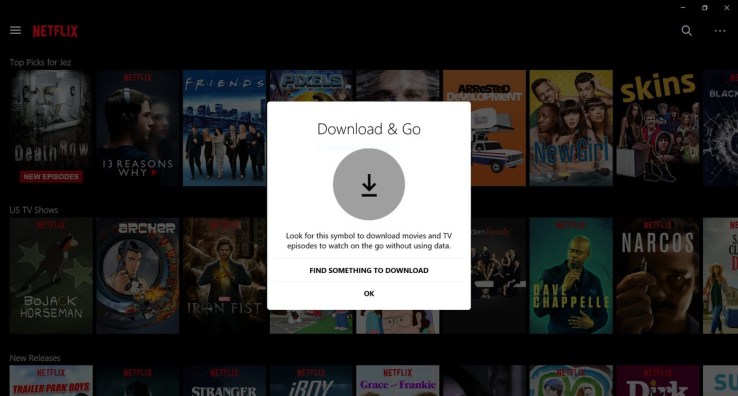
Netflix added support for offline viewing on iOS and Android late last year, and today it’s bringing the same feature to Windows 10, with the exception of Windows 10 mobile devices. Arriving now in the updated Windows 10 application, a subset of the Netflix catalog can be downloaded to your PC or tablet computer, in order to be viewed when a network connection is not available – such as when traveling.


The addition was spotted earlier today by MSPoweruser, an unofficial source for Microsoft and Windows news.


A spokesperson for Netflix confirmed the feature saying, ” Today, the Netflix app will support the downloading feature on Windows 10 laptops and tablets. We are constantly exploring new ways to make this feature available to more members and make it easier for more people to enjoy Netflix on the go.”


Similar to the launch on iOS and Android mobile devices, offline viewing is not available for just any title on Netflix, due to rights issues. Instead, the feature is limited to a mix of Netflix Originals and select licensed content.


However, because of Netflix’s vast selection of its own programming, that still means there are a lot of shows and specials that can be downloaded locally, including popular programs like Stranger Things, House of Cards, Orange is the New Black, Narcos, The Crown, Bloodline, Sense8, and many others, as well as a number of specials, like live standup comedy specials, as well as documentaries and other Netflix films, for instance.


This offline catalog remains consistent regardless of device – iOS, Android or Windows 10 – but it may vary slightly by region, depending on licensing restrictions.


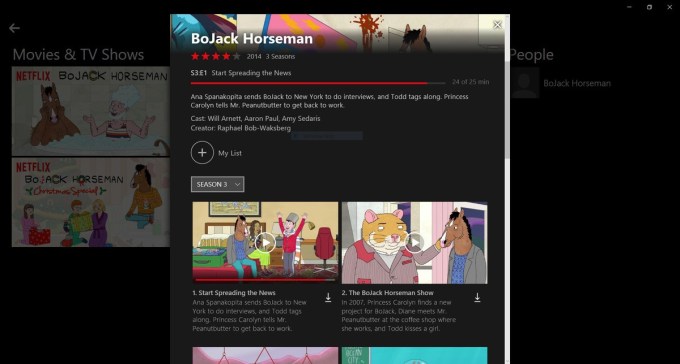
Downloading content is not difficult – in the updated app, you just tap the down arrow next to the show, movie or episode you want to watch to save it to your Windows 10 device. You can also browse for things that can be downloaded through the new section in the app, “Available for Download,” via the menu. Here, another tab called “My Downloads” will let you manage that content.


The feature is now available to users worldwide, Netflix also confirmed.


We should note that there are a few reports from early adopters that downloads are not working properly for them. When they try to download content on a supported device, they’re getting a “download error” message saying “there was a problem.” (Netflix says it’s looking into this problem, and we’ll update if it determines the issue or offers a solution.)


The Windows 10 app is available on the official Microsoft Store, here.


Image credits: Windows Central

Nuzzel launches a ‘Newswire’ for sponsored content


For the first time, news aggregator Nuzzel will include advertising.


That doesn’t mean you’re going to see banner ads popping up all over the startup’s app and website. Instead, the Nuzzel Newswire consists of sponsored links in Nuzzel’s email newsletter, pointing to a blog post, press release or news article of the advertiser’s choosing.


So why call it a “newswire” when it’s really just sponsored content? Nuzzel founder and CEO Jonathan Abrams told me he’s pitching this as an alternative to paying for press release distribution through a service like PR Newswire, where he said “probably few people will really read” it.


“Of course you could do both,” Abrams said. “But the idea is that this is a way to get your content in front of influencers that a traditional press release service may not deliver, since they take anything and release so many press releases every day.”


In contrast, he said the Newswire will only run one sponsored story per day.


Nuzzel promoted story


Nuzzel, for those of you who haven’t tried it, offers a number of ways to keep track of the news, whether that’s following feeds/newsletters curated by Nuzzel or other users, or by connecting your Twitter account to see the stories that are getting the most shares from the people you follow.


Abrams declined to reveal anything about the size of Nuzzel’s audience, except that “it’s fair to say that at this point, the real value of the Nuzzel Newswire is the quality of the audience vs. huge size” — a point underlined on the Newswire website, which highlights a few individual Nuzzel users.


As for why the ads are only running in the newsletters, Abrams said he might add them to other products in the future, but he’s starting with email “because we thought native ads in email newsletters would get really good engagement and not as many people were doing it.”

Interop Tools hits major 2.0 release, now available on Windows Store


Interop Tools


Interop Tools has been updated to v2.0. This is a new major release and not a beta of Interop Tools.


Here is what to expect from Interop 2.0 when it becomes available in the Windows Store.


First let’s start with what this release is supposed to have at the end:


  • App extensibility (will allow third party devs to use Interop Tools APIs to get access to the registry for example if the users allows it via a permission system.

  • Provider extensions, developers will be able to write their own providers as extensions for Interop Tools.

  • Easier installation and management of updates.

  • Blur (because why not).

  • A release on the Store.

  • Project Rome support for easier remote access.

  • File browser support

  • A better tweaks section

  • Lumia x50 unlock process

  • And some other stuff I can’t reveal yet

Currently implemented features in this preview of Interop Tools 2.0 are:


  • Registry Provider extensions

  • Power state Provider extensions

  • Blur

  • Store release


The app is currently available to all Windows 10 platforms starting today. For more information on the implementation on the tool, hit the source link below.


Source


Scheduled is a new app that lets you schedule your text messages


Want to remember to tell a friend happy birthday, good luck or congratulations? Had a follow-up question for a client that just occurred to you at 1 AM? Want to write a heartfelt thank you to be texted at a later date? Unfortunately, neither SMS nor most messaging apps – including iMessage – allow you to draft a text in advance and schedule it to be sent out on a later date. But a new iOS application called Scheduled can help.


To be clear, the app does not actually schedule texts for automatic sending.


For that, you’d need to hack your iPhone and use one of the jailbreak apps instead. Apple does not allow for this functionality, officially.


What Scheduled does is offer an App Store-approved workaround for scheduling texts.


The app itself is simple and straightforward to use.


You first select the person you want to text from your Contacts, then write the text you want to send and select the time you want to be reminded to send the text. When that time rolls around, Scheduled sends you a push notification so you can return to the app to send the text.


After sending, a quick swipe will delete the reminder from the app’s queue.


Scheduled isn’t only for SMS or iMessage, however – it also supports messaging apps like Telegram, WhatsApp, Messenger, Twitter, and it allows you to copy the message’s text to paste it into any other app of your choice. It can be used for reminding you of emails or phone calls, too.


Further down the road, Scheduled plans to add support for LinkedIn and Slack, and it will roll out a few tweaks to the sending flow, Apple Watch integration, and Android support at some point.


To be fair, there are other text message scheduling apps on the App Store, but Scheduled’s interface is clean and modern, compared with those I’ve seen previously.


  1. compose message – text – en@1x


  2. overview – text – en@1x


  3. send with – text -en@1x


The app itself is a product from Brthrs Agency, a digital agency just outside Amsterdam in The Netherlands, which does a combination of client work and startup investing.  The team, which consists of Sebastiaan Kooijman and Robert Keus, tells TechCrunch that Scheduled is currently a bootstrapped company project. They’re considering making it a startup of its own, if it achieves traction.


The team says the plan to make money is to charge $0.99 if you want to add four or more messages to the queue.


Of course, many users are already asking for auto-send functionality following the app’s launch a few days ago, but this is not something that Apple permits.


“We are investigating the options [for auto-send],” says Keus, “but it’s hard from a technical perspective. And our concept is to support people to be thoughtful,” he adds. “When we have auto-send then people can act like robots.”


Agreed.


Scheduled is currently a free download on the iTunes App Store. 

Starbucks is going to try out a mobile order-only store


Starbucks introduced its mobile ordering system in 2015, and it’s been a victim of its own success in some ways. Customers at popular spots are eager to use the mobile ordering system to choose their selection and pay in advance, in the hopes of avoiding a line – but they’re having to wait anyway, thanks to a virtual queue that’s as large or larger than the real one, depending on the spot. Now, it’s looking for ways to make mobile ordering work better, and in pursuit of that goal it’s going to trial a location that exclusively serves mobile order customers, within its own Seattle HQ.


The location will go mobile-only starting next week, Reuters reports, turning one of the Seattle-based company’s two internal cafes into a dedicated mobile order and pay location. All mobile orders from building employees, which include 5,000 people, will be routed to the new location, and it’ll feature a different design, with a prominent pick-up window that also offers a view to baristas preparing the orders, according to the report.


Starbucks added the order ahead and pick-up option to its app across the U.S. in September, 2015, and it’s been a popular feature among users since. The feature allows users to browse the Starbucks menu within the app, select a location, and pay for their order ahead of time, receiving an estimate about when it’ll be ready to pick up. Depending on the location, the order will then be left at a designated pick-up location, or called out by a barista for pick-up like orders made in-store.


Featured Image: Starbucks.com

How Stories Search makes Snapchat a real-time YouTube

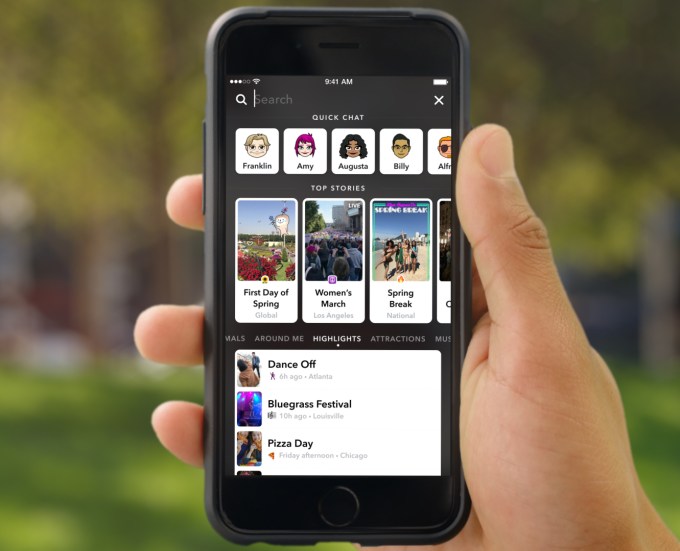
Snapchat is shifting from a social network limited to content shared by people you follow to an ephemeral, real-time database of what’s going on now everywhere. Today Snapchat launched Search for Stories submitted to its public Our Stories. It makes Snapchat as deep as whatever the world is sharing, creating near-infinite rabbit holes to go down, and a stronger competitor for YouTube and Twitter.


That aligns exactly with Snap IPO strategy following the slow-down of user growth after the removal of auto-advance and the launch of Instagram Stories and Facebook’s other competing clones: Snapchat wants to be where some people spend tons of engagement time, rather than where everyone spends a little time.


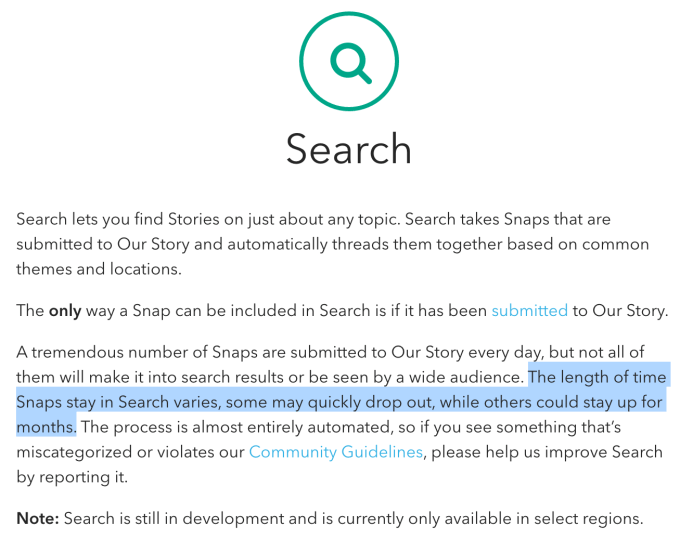
It also sees Snapchat break one of its cardinal rules. User-generated content is no longer limited to a lifespan of 24 hours. A Snapchat spokesperson confirms to TechCrunch that some Snaps submitted to Our Stories that appear in the new Search feature will be visible for less than a day to up to a few weeks or even months.


If content around a theme is being submitted more rapidly, what’s seen in Search results will turn over more quickly, while themes that only get submissions every few days may see Snaps stay visible for longer to make sure there’s something to watch for the theme.


[embedded content]


How Snapchat Stories Search works


In January, Snapchat opened the ability to submit to Our Story from people in certain locations, like big events, or at certain times, like Christmas, to everyone everywhere all the time. But this meant it was pulling in way more content than its human curators could package into specific, widely visible Our Stories like ones for the Macy’s Thanksgiving Day Parade or the NBA Finals.


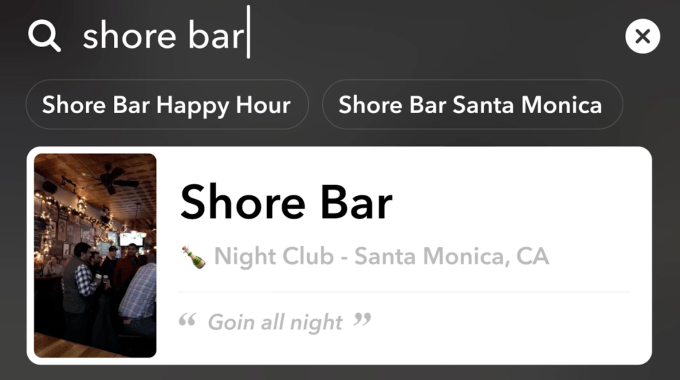
Now, Snapchat is using algorithms to scan the caption text, time and visual elements found in Snaps submitted to Our Story and group them by theme. For example, it could pull out Snaps with the words “dog” or “puppy” in captions, or use machine vision to detect the shape of a real dog in the photos or videos, and aggregate them into an Our Story that comes up when people search for “Puppies.” Snap notes you could use this to watch a nearby basketball game, see what’s happening at a local bar, check out a specific Fashion Week runway show or explore a vacation spot. More than 1 million themes will have Search results available.


Snap says it will keep expanding the ways it categorizes submissions. Perhaps that could eventually include what background music is playing or what voices are saying. 


The rollout of the feature begins with people in select U.S. cities being able to search for public Our Stories, but everyone’s submissions are already being indexed. For now, no ads, sponsored lenses or sponsored geofilters will appear in the Search collections. That makes this a play for more engagement, not a new channel to drive more ad views.


Snaps submitted to Our Story can appear in Search results for up to months, rather than disappearing after 24 hours like usual


Why Search makes Snapchat endless


Previously, you could think of Snapchat like a television with the Stories of people you follow as different cable channels. Discover and Snapchat Shows were like HBO, offering extra premium content. All you could watch was what these channels aired. If you flipped through all the channels and still weren’t satisfied, you were out of luck.


Search is like having the world’s biggest Blockbuster video rental spot open up next door. Suddenly you can browse a near-endless array of content in all sorts of categories, from popular mainstream releases to weird niche foreign films. New films arrive faster than you can watch them, so there’s always something you haven’t seen available.


For the biggest Snapchat fans, this uncaps their potential engagement time. You can now do around-the-clock movie marathons.


Another analogy is to think of Search as turning Snapchat into the ephemeral, real-time YouTube built for mobile video creation. YouTube indexes the world’s online recorded video content with Google’s search prowess. But often there’s a delay of a few hours to days from when something is recorded to when people upload it. And since YouTube was originally built for the web, the clips are typically longer, from 30 seconds to a few minutes.


That norm subtly discourages short-form, mobile-shot, real-time, off-the-cuff content. And that leaves the door open for Snapchat and its new search feature. Instead of just relying on text descriptions and manually added tags, Snapchat is using machine vision to see what’s actually in content, then categorize and index it. Since it’s all mobile and people submit to Our Story as soon as they’ve shot something, plus it’s curated mostly by algorithms, content should be more quickly searchable.


And because Snaps disappear eventually, even if not just after 24 hours here, it encourages the submission and searchability of raw, unpolished, but still compelling content YouTube isn’t getting.


Finally, you could also see Stories Search as a competitor to Twitter. If you want to read what people are saying around a topic in real time, today you search Twitter. But now if you want to SEE what people are capturing with their cameras around a topic in real time, you can search Snapchat. The camera is the new keyboard, after all.


These ideas support the narrative Snap has been pitching to investors. It can’t sell itself on future user growth and eventual massive scale like Facebook since its growth plummeted late last year around when Instagram Stories launched. Instead, while it only has 158 million daily active users, it repeatedly highlighted that they spend 25-30 minutes a day in Snapchat on average. Search thereby fuels Snapchat’s best hope for growth, not in breadth of users but in the depth of their engagement.


If Snap can’t get everyone on earth using it because Facebook’s slew of Stories competitors steal the international markets and older demographics, then Snap must get the U.S. teens it already has addicted to stick around longer. Search is how.

Facebook tests a second News Feed headed by a rocket ship icon


Facebook’s launch of Stories may be the social network’s big news of the week, but some Facebook users have spotted another addition, and are thoroughly confused. A “rocket ship” icon has popped up in the app of select users worldwide, adjacent to the News Feed button. Its appearance is prompting a lot of users to wonder, “what on earth is this thing?”


The button may be either at the top of the screen or the bottom, depending on whether the user is on iOS or Android.


As it turns out, the rocket ship icon is just the latest in Facebook’s ongoing experiments in presenting an alternate News Feed to users – one that consists of posts, articles, photos and videos from sources you haven’t followed, like Facebook Pages or posts news media organizations, for example.


While you might not be actively tracking these sources, Facebook believes it’s content that you’ll like. The items displayed in the “rocket ship” feed come from Pages that are similar to those you’ve already liked, as well as those that are popular with your friends – like a video that many people in your network are watching, for instance.


This is not a new experiment – Facebook was recently spotted testing an alternative News Feed, but was using a different icon (a small square) at the time. That test was also limited to Android beta users, according to reports. A similar earlier test on iOS actually labeled the second feed with the word “Explore.”


The new experiment with the rocket ship, however, is appearing in the mobile version of Facebook across both iOS and Android platforms, including those who have not opted into a beta.


Despite Facebook’s advanced algorithms designed to keep users engaged and endlessly scrolling – and its understanding of what a user has liked, watched, and clicked – the company has not heavily focused its efforts on helping users connect more broadly with interests through recommended content. Instead, today’s News Feed is filled with content a user has explicitly liked, whether that’s friends’ posts or updates from Pages users are following.


But Facebook has always wanted to have a better angle into people’s interests – especially as other networks (like Twitter) have made it easier to follow news and topics, and not just people, brands, and businesses.


In 2012, Facebook introduced “interests lists” to organize its News Feed by topic, but this never saw mainstream adoption. In 2014, the social network experimented again with interests, via its mobile app Rooms, which offered users a means of discussing various topics. But that app eventually failed. 


An alternative News Feed-like stream of information could be another way of tackling interests, but popping it into the app without an explanation is clearly confusing to those who have new feature.


The expanded test is underway now in markets worldwide, we understand. The rocket ship icon itself is fairly new, based on a number of tweets most of which were either posted this month or the last.


A Facebook spokesperson confirmed the global test in a statement, saying “We are testing a complementary feed of popular articles, videos, and photos, customized for each person based on content that might be interesting to them. We’ve heard from people that they want an easy way to explore new content they haven’t connected with yet.”

Twitter’s live streaming app Periscope gets an analytics dashboard


Trying to figure out this whole live video broadcasting thing? Good news!


Periscope, the Twitter-owned live-broadcasting app, picked up a new trick this morning: a shiny new analytics dashboard.


It’s not the most groundbreaking thing in the world, but it makes sense. Making a successful live video on the internet — particularly one that doesn’t involve video games or naked people — is hard. It’s the reason why company after company in this space has failed: Most people just aren’t that interesting all the time.


Perhaps a bit of data on what works and what doesn’t is the key to cracking the code.


Periscope’s analytics dashboard will track video duration, number of viewers, hearts and time watched per viewer. Hopefully they can expand into providing data on a minute-per-minute basis tied to your stream’s replay so you can start to learn exactly where you’re losing people, but this is a solid start.


Meanwhile, Twitter also announced that Periscopes will now be viewable live within the company’s curated news stories, Moments, as the company continues to push into live video across the platform. Don’t count on having your story show up in a Moment — there’s a whole lot of serendipity required there (right place, right time and noticed by the curation team) — but when it works, it could be a good fit.

Facebook will launch group chatbots at F8


Facebook will reveal at its F8 conference a new class of group bots that work inside Messenger group chats. These group bots can keep users informed about real-time news such as a sports game’s progress, e-commerce deliveries and more, according to three sources familiar with the development of the feature.


Facebook is already working with top chatbot makers to prepare for the launch. Facebook will open up APIs to allow more developers to start building group bots, too. When asked for comment, a Facebook spokesperson said “we don’t comment on rumors or speculation,” but my sources confirm this is coming.


For example, a Messenger group of football fans could add a sports bot to their thread, where it could report score changes, big plays and other news from the game. An e-commerce group bot could keep a group of coworkers informed about the status of their lunch delivery, letting them know that the order is being prepared and when it arrives.


Facebook Messenger already features sports news bots from media property theScore and the NBA’s Sacramento Kings, plus food-delivery bots like those from Domino’s. Soon they could be equipped to keep a whole group for friends in the know.


The group bots launch could address two big problems with the Messenger bot platform Facebook launched last year at F8 that TechCrunch previously reported was coming.


First, the group bots will act more like news tickers instead of trying to pretend to be a human discussion partner. They’re not really “chatbots” as much as they are “information bots” as people won’t be having the same back-and-forth conversations as they do with one-on-one chatbots.


Unripened AI technology and poor understanding of questions led many users to be disappointed with Facebook’s chatbots. Facebook’s head of Messenger David Marcus admitted at TechCrunch Disrupt that “The problem was it got really overhyped, very, very quickly. The basic capabilities we provided at the time weren’t good enough to basically replace traditional app interfaces and experiences.”


Since these group bots won’t be the sole conversation partner, there will be less pressure on them to act human, and more opportunity for them to service a specific utility.


Second, their existence in group chats will provide a viral growth mechanism for bots, which don’t have easy discovery channels already.


Currently, users have to type a bot’s name into Messenger’s search box to start a conversation with one. There’s no native way to browse for bots, so businesses have to either get the bot’s exact name drilled into people’s heads through marketing or get them to initiate a conversation with a bot through a Facebook News Feed ad. That’s led to the emergence of little-known third-party browsing options like Botlist.


With group bots, one user could add a bot to a thread, thereby exposing its existence to other friends in the group. Both particular bots and the whole bots platform could see a rise in recognition and audience, which might attract higher-profile developers and brands to build them.


It’s still unclear how exactly users will find and add bots to threads. Facebook doesn’t have a bot store or suggester, but perhaps more bot discovery options will be part of the slew of announcements slated for Facebook’s big yearly F8 development conference on April 18th and 19th in San Jose. We’ll be there to confirm today’s scoop and provide analysis of the rest of the news Facebook reveals.


While truly conversational AI will eventually rise to proficiency, Facebook is smart to refocus on group bot technology that can reliably solve real needs today.


Featured Image: Bryce Durbin/TechCrunch

Facebook Live adds PC game and desktop live streaming


Facebook is taking a swing at Twitch while also one-upping its mobile live streaming video competitors. Today, all users can go Live directly from Facebook’s desktop website via their webcam, stream through professional equipment and software hooked up to a desktop and broadcast gameplay from their computer.


Previously, Facebook had only allowed Pages to stream from their desktop, not users, and only had limited gameplay streaming partnerships with game developers like Blizzard. There will now be a Live button on the desktop status update composer.


The ability to use streaming hardware and software to broadcast straight to the News Feed could allow creators to add on-screen graphics, titles and overlays to make their streams more fancy and polished. Here’s a step by step guide to how connecting hardware or software to Facebook Live works.


Opening up on desktop takes Facebook Live beyond Twitter and Periscope’s options, and brings it into competition with longer-running services like YouTube, Ustream and Livestream, as well as startups like YouNow. Facebook tells me it foresees desktop streaming to be useful for activities like Q&As and vlogging where holding your phone in your hand might be shaky and annoying for both creators and viewers.


Facebook’s aggressive push into live streaming indicates its goal of owning the verb “Live,” and being the place people broadcast when there’s something worth sharing. While Periscope launched first in April 2015, Facebook quickly moved to roll out Live and add a Live API for broadcasting from professional equipment. Periscope only added an API yesterday. Now with the desktop launch, Facebook is looking to be a ubiquitous broadcasting tool.


While the content on Live might not be great yet, and there’s been some troubling broadcasts of violence that Facebook promises it’s working to prevent, it’s still early for the medium. If Facebook can lock-down the content type now, it could enjoy years of broadcasts that give it exclusive content to attract users to the News Feed and space to run lucrative video ad breaks. While mobile is always Facebook’s focus, adding desktop streaming means you can broadcast however you like.

Facebook pivots into Stories

In its biggest change in a decade, Facebook is evolving from text and link-focused sharing to the visual communication format its admits “Snapchat has really pioneered”.


Starting today, all users will soon have access to the new Facebook Camera feature that lets them overlay special effects on photos and videos. They can then share this content to a Snapchat clone called Facebook Stories that appears above News Feed on mobile and works similarly to Instagram’s 24-hour ephemeral slideshows. Users may also share these posts to News Feed, individual friends through the new Facebook Direct private visual messages that disappear once digested, or any combination.


“As people mostly post photos and videos, Stories is the way they’re going to want to do it” says Facebook Camera product manager Connor Hayes, noting Facebook’s shift away from text status updates after ten years as its primary sharing option. “Obviously we’ve seen this doing very well in other apps. Snapchat has really pioneered this” explained Hayes, less shy to mention the competitor by name than some other Facebook executives.


But really it was the rapid ascent of Instagram Stories to 150 million daily users that he says inspired Facebook to start testing its own Stories in January, and keep expanding it to 12 countries before today’s rollout. Surprisingly, Hayes says Facebook Stories is “additive”, not detracting from News Feed sharing or usage of its other Stories products. “We’ve tested in markets with Instagram Stories and Messenger Day, and we’ve seen this as accretive. They end up posting more and they like using the Stories format across apps.”


That’s the worst news for Snapchat and best news for Facebook since the world’s biggest social network adopted the strategy of copying the competitor that refused its acquisition offer.


If Facebook Stories clearly cannibalized News Feed sharing and consumption, it would have to demolish its most popular and lucrative feature to make way for the future where the camera is the new keyboard. And if users saw Facebook, Instagram, Messenger, and WhatsApp’s Stories features as uncool clones or redundant as a set, it might have had to limit its attack on Snapchat to just one of its core apps.


Instead, Facebook can charge in full-speed, attacking Snap from every angle without much penalty to its existing business. And with its enormous engineering and design teams, plus billions in profit each quarter, it can throw more resources at Camera, Stories, and Direct visual messaging than Snap can. That product development strength is in on display with today’s launch, and apparent from Facebook’s insistence on showing reporters forthcoming special effects that one-up Snapchat’s iconic lenses.


Until now, Facebook was just running missile tests and fighting skirmishes on the frontier. Today Facebook declares total war on Snapchat.


Storytelling For Everyone


“The way people have been prompted to share for ten years, it’s very text-centric” Hayes describes. “Even when you look at the way we’ve done this on mobile, you can see half of the screen is still taken up by a place for you to type text.”


“Our new camera puts visual content at the heart of the Facebook experience” says Kristen Spilman, Facebook’s director of art and animation. “So it feels natural for the camera to do more of the talking.”


Facebook has been casually pursuing visual communication for years, but got serious about it back in August when it started testing the first version of Facebook Camera during the 2016 Olympics. It went so far as to replace half the News Feed home screen with an open camera window. But while Snapchat opens straight to the camera, Spilman says “people were not comfortable with how drastic some of the change was”. It can be pretty jarring to suddenly see your own face on screen, so Facebook decided to hide the camera but let you open it with a swipe. Hayes says Facebook would consider opening to the camera “if over time we find this becomes the primary use case.”


Facebook wants to make Camera and Stories accessible to the wide range of demographics that use it everyday, not just the teens that gravitate to Snapchat. “We learned from Instagram that Stories as a format is actually great for all types of people”, says Hayes. “We think it’s going to be adopted by people regardless of age.”


Courting the international market was also a priority for Facebook. It’s built text-overlay filters using local slang for around 10 different top markets, like the US and Canada. In Ireland users can slap the words “Gas” or “Some Craic” on their posts, which might confuse those abroad but mean “astonishing” and “having a good time” in the country.


This is how Facebook plans to recruit users to Stories that Snapchat has forgotten. While the LA startup has focused almost entirely on US teens, Facebook designed its version to appeal to teens everywhere and be intuitive enough for older users Snap shunned with its esoteric interface.


How to use Facebook Stories, Camera, and Direct


Facebook’s obvious but somewhat cluttered design puts its new products readily accessible from the home screen rather than buried in tabs.


Stories


Just like with Instagram Stories, you’ll immediately notice the circular Stories bubbles in a row above the News Feed, showing the profile pics of friends who’ve posted, ranked by relevancy rather than reverse chronologically like Snapchat. This solves the problem that you didn’t necessarily add all your friends to see their Stories. Even though your boss or distant acquaintances might post, you’ll see your closest friends first, which makes sure you get the maximum value no matter how long you spend watching.


One big problem with Facebook Stories is that they’re visible to all your friends and for now you can’t change that. That interferes with the more casual, off-the-cuff, goofy, personal style of content people typically post to Stories, which they might not want their boss or family to see. Facebook should build a privacy feature for hiding your Story from certain people. At least you won’t see Stories from anyone you unfollowed on Facebook, like annoying old buddies or exes you want to avoid.


As you watch the chronological slideshows of photos and videos you can tap to fast-forward a frame or swipe to skip to the next friend, each of which can see who watched their Story in what order. Relevancy-sorting also empowers auto-advance so all your friends’ Stories play in a row, unlike Snapchat which makes you clumsily create a manual playlist of which to watch.


A text and image reply bar appears overlaid on Stories so you can quickly type or shoot a response that gets sent over Direct. These replies only live as long as the 24-hour disappearing content, so friends will have to check them quick or miss them entirely. The readily visible reply bar might slightly obstruct the view, but should greatly increase reply frequency.


For now, Facebook Stories can’t be viewed by your public followers, so the product is effectively pushing social media influencers to do their broadcasting on Instagram Stories where verified profiles get special features. There’s also no Pages or businesses allowed on Stories for now, or ads inserted between Stories. However, Spilman says once Facebook is sure users love Stories, “We’ll considering broadening to brands and businesses.” Injecting ads could give Facebook a new supply of ad inventory just as it expects to run out of News Feed ad space — something that’s worried Wall Street in recent earnings reports.


Camera


A quick swipe right from the feed reveals the Facebook Camera where you can tap to shoot a photo or hold to record video. After you jazz it up to your liking, you can either post to your Story, to the News Feed, to specific friends via Direct, or any mix of these. The option to blast a Camera post to all of them could be spammy, but sometimes you might want to share the best scene from your Story to News Feed. Facebook even encourages Camera post to News Feed by making them full-bleed thanks to overlaid profile pics and  Like/comment buttons.


Along with shooting new stuff, you can upload from your camera roll with no restrictions or borders on old content. You’ll only see letter boxing if content was shot on a device with a different aspect ratio. Videos have a max length of 40 seconds, much longer than Snapchat’s 10 and Instagram’s 15. That means you can share longer videos you’ve recorded or downloaded, like viral clips.


Facebook’s Camera offers most of the creative tools you’d expect plus a lot more.


What’s in Facebook Camera:


  • Drawing with resizable marker and chalk brushes

  • Emoji stickers

  • Colored captions

  • Animated selfie lenses and masks

  • Environmental effects like highlight lines and fun house mirrors

  • Reactive filters that respond to movement like lava lamp colors

  • Iterative filters that surprise you with new effects if you get more people in frame

  • Fine art style transfers that make your images look like line drawings or impressionist paintings

  • Professional artist filters like Hattie Stewart’s doodle bombs and Doug Copeland’s psychedelia

  • Licensed filters from six movie studios, including a Minions filter

  • Cause-supporting filters like rainbows for gay pride

  • Geotagged location filters for certain places

  • Country-specific filters for around 10 initial markets

What’s missing:


  • Simple Instagram-style color filters for boosting exposure or contrast (Snapchat, Instagram)

  • 3D stickers for pinning text, emoji, or drawings to objects in a video (Snapchat)

  • Playback effects for slow-mo and fast-forward (Snapchat)

  • FaceSwap (Snapchat)

  • User- and business-submitted filters (Snapchat)

  • Caption background colors for easy reading (Instagram)

  • Location tags for turning any place name into a stylized sticker (Instagram)

  • Mentions for tagging friends (Instagram)

  • Computer-generated filters that turn any text into frames (Messenger)

  • Who’s Up For? filters for inviting friends to hang out (Messenger)

Rather than hiding special effects behind an unintuitive tap like Snapchat, a column of dots denotes that you can vertically swipe through suggested special effects like ones for a current holiday or your city. There’s also a whole tray of 50 to 70 categorized effects showing the most popular ones, those you’ve recently used, selfie masks, style and color filters, and overlaid illustration frames.


Facebook refused to detail any financial details of its licensed filters like the Minions movie effect. It could try to pull sponsorship revenue from these like Snapchat, or just curate ones people will actually want and offer them free like Facebook already does with branded stickers.


When Facebook gathered reporters in San Francisco yesterday to demo the product, it clearly wanted us to think of it as going a step beyond Snapchat’s offering. That’s why it showed off high-tech effects that aren’t available yet. One, for example, adds Mario-esque music and throws 8-bit sunglasses on each additional person who comes into frame, with a bonus effect if you can get five people on camera together.


The next big opportunity here for Facebook is turning Camera into a platform. As I wrote last year, Facebook can’t possibly dream up every possible special effect people might want. Snapchat already allows filter submissions and payments in exchange for temporary geoflters. By allowing users and AR developers to submit filters. Facebook could make its camera’s breadth infinite. Though Facebook was cagey, the team admitted “that is a long-term vision for the platform.”


Overall, Facebook Camera feels extremely powerful and polished, with effects popping up fast and a sensible way of organizing them all. It doesn’t require you to know secret tricks or techniques, which can be fun for the teen in-crowd but alienating to olds. Whether or not you use Stories, Facebook Camera should help you express yourself more vividly.


Direct


While Facebook split chat off its main app a few years ago and forced people to download Messenger, Direct brings private communication back to the main app. Anything you shoot or upload through Facebook Camera can be sent to specific friends who’ll receive it in their Facebook app’s Direct inbox. You just can’t start with a text. These messages last at least until they’re viewed, and will remain visible until the conversation stops. So if you’re rapidly replying back and forth with text or images about a Direct message it will stay alive, but it goes away once you cease to banter.


Facebook tells me after content disappears from your Story or Direct messages, it completely deletes the content off its servers. The only exception is if it’s flagged by someone for violating Facebook’s community standards, in which case it’s kept until the investigation concludes. Though it might seem a bit redundant with Messenger also having its own camera, Hayes says “it’s not out intention to build up Direct as a Messenger replacement.”


The New News Feed


Whenever you move 1.8 billion people’s furniture, some are going to get pissed. Loyal Snapchat users or those who’s friends primarily live on Instagram might see Stories as making Facebook too cluttered, bloated, or redundant. But there are still at least a billion people who would probably enjoy Stories that aren’t using them every day yet. These are Facebook’s core targets with today’s launches.


Now people have Stories for each way they might want to share. Instagram Stories is for artful photography. Messenger Day is for igniting conversations and inviting friends to hang out. WhatsApp Status is for minimalist visual communication. And Facebook Stories is for showing you day-to-day life to the widest audience. Though subtle, those differences are likely why Facebook doesn’t offer any cross-posting options, making creators do the labor of re-uploading everywhere if they want to reach all their networks.


Don’t expect Stories in Facebook’s apps to suddenly stamp out Snapchat. Facebook’s best hope is that US teens who are addicted to Snapchat end up using its Stories too. But Snapchat’s neglect of international markets and older age demographics left the door open for Facebook. Now with its aggressive invasion of the Stories space, it may claim those segments before Snapchat ever gets a chance, blocking the upstart’s growth.


In the long-run, we remember the tech companies that provide value at scale, not just who invented things. We remember Netscape as an innovator, but that doesn’t make Google Chrome a clone. Facebook was willing to swallow its pride to protect its future. Maybe if Yahoo or BlackBerry were willing to pivot like this, they’d still be in power.

Facebook tests an enhanced local search and discovery feature offering business suggestions


Facebook is testing an enhanced local search feature that could see the social network creeping in on Google Maps, Foursquare and Yelp territory, TechCrunch learned and Facebook confirmed. Facebook users are now able to surface recommendations of nearby places – like “dinner nearby” or “bars nearby,” for example  – by entering a query in Facebook’s search box on the web or mobile. This returns a box in Facebook’s search results that include a list of relevant businesses, along with their ratings on Facebook, a map, as well as which friends of yours have visited or like the places in question.


A spokesperson for Facebook confirmed the feature saying, “We’re testing a new way to discover where to go and what to do around you.”


The company declined to share other information about the addition, including how long the test has been in progress. It’s possible some users have had this option for a much longer time, but others are only now gaining access or don’t have it at all, as is standard with Facebook’s tests.


The feature itself isn’t immediately obvious because the place suggestions aren’t always the first search result. On the web, the map and list of recommendations often show up as you scroll a bit further down, below the results for posts from Groups, links, posts from friends, and Facebook Pages.


But on mobile, the results are much closer to the top, if not the first item. (It varied depending on the query, in tests.)


The suggestions themselves are in a small box in the search results that includes a pink pin drop icon next to the heading, like “Shopping & Retail Nearby” or “Pizza Places Nearby” or whatever else you may have searched. Facebook is also prompting these searches via auto-complete suggestions from the search box.


It’s unclear how Facebook determines which results to show you in the small box, as it’s seemingly not number of reviews, rating, or proximity to your current location that determines which places are shown first. Nor is it social data  – for instance, a place visited by over a dozen friends was returned below one visited by just a few.


Beneath these initial suggestions, you can click “See all” to be taken to a fuller list.


In addition to standard information like the business’s name, address, phone number, and photos, Facebook displays how many people have rated the business, its star rating, pricing (as measured by one to four dollar signs), whether it’s open now, plus the above-mentioned social data about your friends’ visits and likes.


Facebook is also using technology to parse users’ reviews in order to highlight what the business in question is known for, or what people talk about in their reviews.


For example, a bakery’s review might say that “people talk about friendly service, vegan donuts and iced latte.” (Nope, Facebook’s tech doesn’t have a grip on proper grammar just yet.)


Plus, the business listings may have a call-to-action, as they do on their Page – like “Sign Up,” “Shop Now” or “Call Now,” for example.


On the web version of the feature, you can filter the search results by price, places that are currently open, or other social metrics, like “visited by friends” or “good for groups.” Restaurants can also be narrowed down by cuisine (pizza, sushi, Chinese, etc.). And you can “Like” the business on both web and mobile.


Facebook is clearly taking advantage of its wealth of data on businesses and social metrics to build out this feature – an inevitable next step for the business, given the obvious opportunity for search ads.


This is hardly the first time that Facebook has dabbled with serving up local business info, however.


Way back in 2012, Facebook launched Nearby, following its acquisition of Foursquare competitor Gowalla. That feature did much of the same thing, and still exists in its present form from the “More” menu on mobile. The integration of “Nearby” suggestions in the search results seems more like an iteration on this earlier feature. But it adds functionality – like the calls-to-action and the algorithmically-parsed customer reviews – which makes it a bit more functional.


Above: Facebook Nearby, circa 2012


What’s interesting is that, despite everything Facebook knows about its users, the suggestions were not ranked as well as they could be. For instance, just because a lot of my fellow parents have hosted kids’ birthdays at Chuck E. Cheese, that doesn’t warrant the restaurant from getting top billing in a list of suggested pizza places. It also pushed a lacrosse uniform shop and the teen-focused Hot Topic to the top of its suggestions for “Women’s Clothing Stores Nearby.” Uh, no.


Above: various filters in the Nearby feature in search


Either Facebook isn’t fully tapping into its data to make these suggestions, or its data alone is falling short. If the latter, it could use another infusion – like the data from Foursquare.


Facebook had skipped over Foursquare years ago in favor of Gowalla. But today’s Foursquare is more powerful than the social check-in app of the past. Its database of locations is integrated into over 100,000 apps (including Snapchat), it offers businesses useful analytical data on foot traffic, it partnered with Nielsen to map digital ads in order to connect them to real-world traffic and sales, and it just rolled out a push notification-based recommendation engine to developers.


It’s not hard to imagine how well these features would fit into Facebook given how closely they’re aligned with Facebook’s own goals. But Foursquare’s trouble with finding an exit has always been about its price and valuation.


In the meantime, Facebook’s existing “Nearby” feature and this new local search addition pale compared with what Foursquare, Yelp or Google today offer consumers. It’s handy, I suppose, if you happen to be on Facebook, but it’s not worth launching Facebook for this alone when better options exist.


Additional reporting: Josh Constine


(Image credit, dinner nearby, h/t: Jose Gutierrez) 

Tinder Online is a new web version of the dating app


Tinder is today introducing a new way for users to access the platform with the launch of Tinder Online, a web-optimized version of the dating app so people can Tinder at their desktops.


Tinder Online still requires that you sign on to your account through Facebook, and it doesn’t include any of Tinder’s revenue features like Tinder Boost or Super Like, for now.


Head of Product at Tinder, Brian Norgard, says that Tinder Online is meant to serve users in emerging markets who don’t have enough storage on their phone (the app is 128MB on iOS) or a big enough data plan for Tinder’s image-heavy feed. It’s also meant to offer Tinder power users the option to do their swiping and messaging on desktop, which is far easier on power users than a mobile app.


And, according to the blog post, Tinder Online is meant to serve users who are tied up at their computer, either in class or at work, and want to switch between Tinder tabs and actual productivity.


Introducing Tinder Online: a fun, new web experience and your English professor’s worst nightmare. Mobile phones not allowed in class? Just fire up your laptop and swipe incognito. Cubicle life got you down? Now you can toggle between spreadsheets and Super Likes in a flash. “Not Enough Storage?” Not a problem. Don’t let life get in the way of your Tinder game.


While the branding message of Tindering during class or work is questionable, the product itself makes a lot of sense.


Tinder has always been a native mobile app, first on iOS and then on Android. But the company now serves 196 countries across the world, and is learning to be flexible when it comes to giving people options about how they use Tinder.


As far as privacy is concerned, Tinder says that the only information it collects about users who log on to Tinder Online is location via the browser. Remember, Tinder uses Facebook as a log-in mechanism, so there is no shortage of personal information to which the company has access for the purposes of matching, marketing, or advertising. Browser history simply isn’t necessary.


“Our DNA is mobile so there was a learning curve involved in building something for a bigger screen,” said Norgard. “It was a challenge because when you start your birth as a mobile company, building for the web feels like you’re going backwards. There is a different skill set from a design perspective and a user behavior perspective. What makes Tinder great on your phone might not make it great on the desktop, and vice versa.”


From a philosophical standpoint, Tinder can feel to some users like more of a game than a social dating app. The company has made minor tweaks to counter this. The Tinder app used to say “Keep Playing!” after a match in big letters, prioritized over “Send Message.” Now, “Send Message” is prioritized over “Keep Swiping!”


On a broader scale, Tinder is built to be used as a time-sink just as much, if not moreso, than as a dating app that helps you connect with potential mates.


Making it accessible via web, and encouraging users to ignore class or work and Tinder instead, doesn’t necessarily make the app any more focused on the goal of connecting people, but rather getting as many swipes and matches as possible.


From a business perspective, Tinder fuels itself on user growth, with the hopes that those users convert into paid users, either subscribing to Tinder Plus or purchasing add-ons like Tinder Boost. Allowing users to access the platform from anywhere with an internet connection, without having to install any software, lowers the barrier to entry.


The launch of Tinder Online comes on the heels of news that Tinder was running a secret, members-only version of the app called Tinder Select, which lets invite-only users toggle between ‘celeb’ Tinder and regular-person Tinder. You can read more about Tinder Select here.


Tinder is currently testing Tinder Online in Argentina, Brazil, Colombia, Indonesia, Italy, Mexico, Philippines, and Sweden, with plans to launch everywhere ‘soon’.

Facebook Stories looks like an ill-fitting mask


Facebook has finally capped off its strategy of cloning Snapchat’s USP by slotting a camera-first, ephemeral multimedia sharing feature into its entire social sharing estate.


Today it’s flicked the official switch on a global rollout of the feature in the main Facebook app, where these disappearing Stories are pinned to contacts above the News Feed — thereby making them almost impossible to ignore, especially given their fleeting lifespan.


Earlier this month the social sharing giant added a similar visual sharing feature to its Messenger app — triggering complaints that it was messing with the user experience.


It did the same, in February, with its messaging platform, WhatsApp, and also annoyed users by trying to replace a text status feature (which it’s since restored).


The Facebook Snapchat cloning strategy kicked off in August 2016 when the company debuted the disappearing Stories format on its photo and video sharing platform Instagram, clearly the most natural home for the clone.


And Instagram Stories has since apparently managed to dent Snapchat’s growth, which was clearly a core strategic aim for Facebook.


That and creating vastly more video inventory across Facebook’s portfolio of social apps — into which it can inject more lucrative video ads.


Training users to share the kind of content where ads can natively blend is really what Stories is all about.


All video, all video ads


None of this should be surprising. The company has previously publicly suggested its entire platform will be “all video” in the coming years.


It’s also taken user-hostile design decisions such as removing the ability to send text messages from its main Facebook app. (And the aforementioned attempted rubbing out of text statuses in WhatsApp).


So, basically, if you want to spam all your Facebook friends with a video of yourself wearing an animal selfie lens, Facebook will happily put all its tech at your disposal. But if you wish to swap a few words with people in your Facebook network, Facebook actively discourages that by requiring you switch to its Messenger app to do so. It’s very clear where the company’s priorities lie.


Yet it remains to be seen whether Facebook users in general are going to be flocking in droves to engage in the kind of throwaway visual sharing Stories encourages — with the format effectively asking them to repackage private lives into what amounts to a self-promoting public ‘ad format’, complete with stickers, silly effects and so on.


Thing is, for several years Facebook has had a problem with users posting fewer personal updates. This too is not surprising, given the network has something of an identity crisis these days. It’s certainly a far cry from the original concept of linking university friends across a campus.


Instagram is obviously the more natural home for people with a love of visual sharing generally (including those who want to build public followings for what they share). While WhatsApp/Messenger are for communicating privately with friends and/or in more bounded groups. So the question arises, who is Facebook for?


The people in the average Facebook network may well include a number of uni friends but also various family members, workmates across different jobs, folks you once met at a party, friends of friends, old school friends, professional connections and even random strangers.


Such an assortment of ‘connections’ likely does not constitute either a close-knit group of friends nor a unified group of people with shared interests. The only loosely linking factor is they all (maybe) met you at least once in your life.


Nor are Facebook friends likely to be a uniformly active network. I see huge variation in terms of content sharing in my own network, for example.


It will undoubtedly take a certain type of person to want to blanket broadcast Stories across such a varied and variously segmented network. (Stories can be shared with specific Facebook friends only, but the default push for the format is clearly to encourage sharing with all.)


The mask slips


Anecdotally, a very small subset of my own Facebook connections also appear to account for the vast majority of personal updates still being shared. (Doubtless exacerbated by the algorithmic effect of the Facebook News Feed promoting posts that get more engagement).


Could I imagine these most actively sharing Facebook users sharing Facebook Stories? Perhaps a few of them — so an even smaller subset.


But the handful of users I see who are still regularly sharing personal stuff on Facebook appear to be doing so either to spark debate on a particular issue/topic; to entertain and/or garner public attention/likes; or to ask for (and in so doing share) information/advice with a group — functions that all feel secondary as far as Stories is concerned, given the emphasis here is squarely on visual entertainment.


I may be wrong but it’s very hard to imagine serious or substantial topics being debated via Stories, what with all the selfie lenses, movie masks, and visual effects Facebook is touting…


Stories can also be posted to the Facebook News Feed. So there is at least the possibility that someone could use the format to try to garner comments in the usual way, by turning it into a standard piece of public Facebook content.


But I can’t imagine how such a promotional format could sensitively touch on some of the topics I’ve seen discussed across Facebook in recent years, including very difficult issues like child abuse, depression and marriage breakdown. A selfie lens really isn’t going to fit.

Instagram begins blurring some sensitive content, opens two-factor to all


Instagram is already doing a lot to spot and censor posts that violate its community guidelines, like outright porn, but now it’s also taking steps to block out potentially sensitive material that might not technically run afoul of its rules. The social network is adding a blurred screen with a “Sensitive Content” warning on top of posts that fit this description, which basically means posts that have been reported as offensive by users, but don’t merit takedowns per the posted Instagram guidelines.


This is an app feature that will add a step for users who aren’t worried about being scandalized by images posted on the network, since you’ll have to tap an acknowledgement in order to view the photo or video. The blurred view will show up both in list and grid display modes, and Instagram says it’ll prevent “surprising or unwanted experiences” in the app. It’s likely that Instagram is trying to find a balance between reducing community complaints and keeping its guidelines relatively open.


The second big update is the broad release of two-factor introduction to all users. Previously, this was available only to a limited set of members, despite the near-universal recommendation from security experts that they use two-factor wherever available. You can enable this feature using the gear icon in your profile page and enabling the option to “Require Security Code” under “Two-Factor Authentication.”


Instagram’s new blurred content filters are another step in its continued efforts to clean up its act relative to community abuse and spam. Other steps the social network has taken include disabling comments on individual posts, and offering reporting tools and support within the app for cases that involve potential self-harm.

Facebook Messenger rolls out mention alerts and message Reaction emoji


Group chat will get a bit less chaotic with the global rollout of two Facebook Messenger features it was previously testing in Vietnam.


Users can now @mention friends in a group chat to send them a special notification to reply to your message so they don’t miss it in a noisy thread. You just type @, then the person’s name or in-thread nickname, and the name will be highlighted and that person will get an alert.


Meanwhile, Facebook is bringing its News Feed Reactions to Messenger so you can reply by attaching a love, smile, wow, sad, angry, thumbs-up or thumbs-down emoji to a specific message. This way you’ll be able to simply express agreement, disagreement or an emotion about a particular message, even if a bunch of other messages have come in since.


Tap and hold on a message to pull up the Reactions menu and select one. Everyone will see a counter of different reactions on the message, and you can tap that counter to see exactly who reacted how. Reactions work in one-on-one chats, too.


The “Thumbs-down” Reaction could be interpreted as Facebook’s first real “Dislike button.” However, Facebook calls it a “No” Reaction and told me that since people often use Messenger for coordinating logistics, it wanted to add easy ways to vote for or against a proposed plan.


TechCrunch first spotted and reported on a test of Messenger Reactions early this month, and also saw that users in Vietnam were trying out mentions. Reactions works very similar to iOS 10’s iMessage’s Tapback reactions launched in September, and Slack’s more expansive and long-standing emoji reaction selector.


Messenger Reactions work the same as iMessage’s Tapback reactions that launched last year


Doubling down on group chat is smart for Messenger at a time when it’s been criticized for injecting social media content broadcasting into the communication app via Snapchat Stories clone Messenger Day. Messenger actually started as a group chat app called Beluga before Facebook acquired it. With mentions and Reactions, Facebook could use its better group chat experience than SMS to win users from the status quo.